Jar of Beans - Android Emulator Portable - Beta - Multi Userdata Support
Ultimamente non sopportavo più bluestack, ne a casa, ne in ufficio...
Cosi mi sono detto, magari posso rendere portable il pacchetto di google android emulator, con jelly bean, a tempo perso ci sono riuscito.
supporta l'accelerazione x86 HAXM e accelerazione GPU
Per il corretto utilizzo consiglio di installare il pacchetto di driver Intel HAXM, lo trovate nella cartella dentro al pacchetto:
extras\intel\Hardware_Accelerated_Execution_Manage r\
a segutio avvite il file:
jar of beans.exe
attendete l'avvio di android e divertitevi.
per praticità ho integrato un pulsante per installare gli apk...non si sa mai.
per uscire dal fullscreen premete: ALT+ENTER
un grazie è molto gradito.
------------------------------------------------------------------------------------------------------------------------------------------------------------------------------------------------------
Lately I could not bear Bluestack, it at home, in the office he ...
So I said to myself, maybe I can make the package portable google android emulator with jelly beans, in his spare time I did it.
acceleration support HAXM x86 and GPU acceleration
For the correct use advise you to install the driver package Intel HAXM, can be found in the folder in the package:
extras \ intel \ Hardware_Accelerated_Execution_Manager \
segutio avvite to the file:
jar of beans.exe
wait for the launch of Android and have fun.
for convenience I integrated a button to install the apk ... you never know.
to exit fullscreen press: ALT + ENTER
thanks is very welcome.
translated with google translator
------------------------------------------------------------------------------------------------------------------------------------------------------------------------------------------------------
Android Jelly Bean 4.1 from google SDK
(search chef for custom rom)
NEW BETA!!!!
DOWNLOAD JAR OF BEANS - BETA2 REPACK BUGFIXED
new:
SD CARD MANAGER INCLUDED
BUGFIX user select and delete after BETA2
added custom settings for each user
added resolutions:
800x480
1024x600
1280x768
1400x900
1920x1080
old:
other bugs fix
ADDED MULTI USERDATA (beta)
added custom Port/Adb Port (beta)
added option panel, with RAM size and Verbose on/off (alpha)
minor bugfix (window sizeble, debug frame dimension ecc) (alpha)
alert to end of "install apk" (alpha)
bugs:
hard keyboard dont work
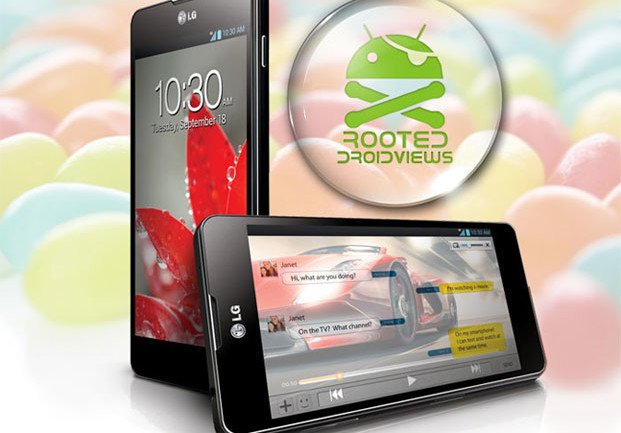
LG officially releases the G Flex, a 6-inch curved OLED smartphone
Features include a curved display, self-healing rear skin and back-mounted buttons
We've had our fair share of looks at the then-unannounced G Flex, and now LG has made its curved phone official. Unlike the recently-revealed Samsung Galaxy Round, the G Flex is curved on the horizontal axis (think Galaxy Nexus) and seemingly more dramatically based on the pictures LG has released. Aside from the curve, the G Flex follows LG's design language found on its other "G series" devices, including the rear-mounted buttons we first saw on the LG G2.
In terms of specs, the G Flex has an OLED display, as we'd expect for such a curved panel, but is unfortunately only 720 x 1280 resolution — at 6-inches diagonally, that pegs the pixel density at 244 ppi. Inside, we're looking at a MSM8974 (Snapdragon 800) processor clocked at 2.26GHz, 2GB of RAM, a 13MP camera, 32GB of internal storage and Bluetooth 4.0. As expected, for now this is a South Korea-only affair. Also interesting, LG says the rear of the G Flex will feature a self-healing coating, designed to automatically fill small scratches in the finish.
As you'd expect the G Flex is running Android 4.2.2 with LG's own software customizations. LG seems to be crafting its software to take advantage — or at least be accommodating — of the curved screen, shifting elements on the screen based on how the phone moves. Beyond that, it isn't entirely known what new software features will be G Flex-specific. See the press release after the break.
LG UNVEILS WORLD’S FIRST “REAL” CURVED SMARTPHONE
LG G Flex Stays Ahead of the Curve to Lead Evolution of Smartphones with Breakthrough Innovations
SEOUL, Oct. 29, 2013 — Setting a new milestone in the evolution of the smartphone, LG Electronics (LG) today officially took the wraps off the LG G Flex, a smartphone curved to follow the contour of the face, the first device to offer such a design in the smartphone market. The latest device in LG’s premium G Series, the G Flex incorporates proprietary innovations from other LG companies in the form of the display and battery that have never been seen before. The LG G Flex also boasts new user experience (UX) features that take advantage of the curved form factor.
“The LG G Flex is the best representation yet of how a smartphone should be curved,” said Dr. Jong-seok Park, president and CEO of LG Electronics Mobile Communications Company. “The LG G Flex with its distinctive design, innovative hardware and consumer-centric UX represents the most significant development in the smartphone space since smartphone became part of our regular vocabulary.”
Form + Function: Design that Understands Human Curves
The vertically curved design of the LG G Flex reduces the distance between one’s mouth to the microphone when the device is held against the ear, as traditional telephone handsets used to. The LG G Flex employs a curvature arc that is optimized for the average face, to deliver improved voice and sound quality. The curved form increases the sound level by 3dB compared to typical flat smartphones. The curved design also offers a more reassuring grip and fits more comfortably in one’s back pocket. What’s more, in landscape mode, the display offers an IMAX-like experience, with the result being the most comfortable viewing angle for watching videos or playing games.
LG G Flex also features the Rear Key first introduced in the LG G2. Devoid of any buttons on the sides, there is less chance of accidentally powering off the phone and the convenience of using one’s index finger to adjust the volume when conversing is maintained.
Innovation Delivered Through Collaboration
The development of LG G Flex was only possible through the successful collaboration with sister companies LG Display and LG Chem. The 6-inch display found in the G Flex is the world’s largest Plastic OLED (POLED) display developed and mass produced specifically for smartphones. The ultra-thin, ultra-light flexible POLED display and curved OLED panel are built on plastic substrates instead of glass, giving LG G Flex its unique shape and durability. The POLED display is brighter and more precise thanks to the application of Real RGB, which contains all three sub-pixels — red, green and blue — in one pixel.
LG Chem developed the world’s first curved battery technology specifically for application in LG G Flex. The curved battery in the G Flex is designed with LG Chem’s patented Stack & Folding technology, which reduces the physical stress on the battery pack when in the curved form and provides better stability and performance. Despite its thin form, the LG G Flex battery has a capacity of 3,500mAh, enough power for more than a full day of use.
User-Centered Technologies
Among the several new technologies, the LG G Flex is the first smartphone to apply a “Self Healing” coating on the back cover. The elastic coating has the ability to recover from the daily wear-and-tear scratches and nicks that un-cased smartphones are likely to receive, keeping the G Flex looking newer longer.
Users of LG G Flex will have a wider selection in the ability to enjoy in various format of music — MP3, CD quality or 24 bit/192kHz Hi-Fi playback. UX features, such as KnockON, Guest Mode and Plug & Pop, which were positively received when first introduced in the LG G2, can also found in the LG G Flex. The LG G Flex also includes an array of new UX features:
- QTheater gives users quick access to photos, videos and YouTube right from the lock screen. By touching the screen and dragging outward along the curved surface with both fingers, the apps appear with the effect of theater curtains being drawn.
- Dual Window divides the wide 6-inch screen into two separate windows for more effective multitasking.
- Swing Lockscreen alters the image on the lockscreen depending on how the G Flex is held.
- Face Detection Indicator displays the LED on the Rear Key in green to confirm status of face detection and focus.
- Camera Timer flashes the Rear Key LED to indicate that the countdown has begun.
- Urgent Call Alert flashes the LED on the Rear Key in red when several consecutive calls from the same person go unanswered.
- Dual Window divides the wide 6-inch screen into two separate windows for more effective multitasking.
- Swing Lockscreen alters the image on the lockscreen depending on how the G Flex is held.
- Face Detection Indicator displays the LED on the Rear Key in green to confirm status of face detection and focus.
- Camera Timer flashes the Rear Key LED to indicate that the countdown has begun.
- Urgent Call Alert flashes the LED on the Rear Key in red when several consecutive calls from the same person go unanswered.
The LG Flex will be available in Korea starting in November through all three major local carriers. Availability in additional markets will be announced thereafter.
Key Specifications (Korean Version):
- Chipset: 2.26 GHz Quad-Core Qualcomm? Snapdragon™ 800 (MSM 8974)
GPU: Adreno 330, 450MHz
- Display: 6-inch HD (1280 x 720), Curved P-OLED (Real RGB)
- Memory: 2GB LP DDR3 RAM / 32GB eMMc
- Camera: Rear 13.0MP / Front 2.1MP
- Battery: 3,500mAh (embedded)
- Operating System: Android Jelly Bean 4.2.2
- Size: 160.5 x 81.6 x 7.9 - 8.7mm
- Weight: 177g
- Network: LTE-A / LTE / HSPA+ / GSM
- Connectivity: BT 4.0 / USB 3.0 compatible / WiFi (802.11 a/b/g/n/ac) / NFC
- Color: Titan Silver
- Other: TDMB / Hi-Fi 24bit, 192kHz Playback
GPU: Adreno 330, 450MHz
- Display: 6-inch HD (1280 x 720), Curved P-OLED (Real RGB)
- Memory: 2GB LP DDR3 RAM / 32GB eMMc
- Camera: Rear 13.0MP / Front 2.1MP
- Battery: 3,500mAh (embedded)
- Operating System: Android Jelly Bean 4.2.2
- Size: 160.5 x 81.6 x 7.9 - 8.7mm
- Weight: 177g
- Network: LTE-A / LTE / HSPA+ / GSM
- Connectivity: BT 4.0 / USB 3.0 compatible / WiFi (802.11 a/b/g/n/ac) / NFC
- Color: Titan Silver
- Other: TDMB / Hi-Fi 24bit, 192kHz Playback
Samsung wants to help you become a rock star developer
The Samsung SDK and this week's Developer Conference will take you from frustration to fulfillment
Meet Derek. He's a struggling mobile developer who can't seem to get the ideas from his head onto his phone. When he's finally had enough, his cries for help are answered by a glittering magic envelope — an invitation to the Samsung Developers Conference. Soon his problems are overcome, he's the envy of his co-workers, and he owes it all to the Dev conference and the Samsung SDK.
Ok, the premise is over-the-top a little bit. Or a whole lot. But the idea here is to get you — the potential app developer for Samsung's Android-based phones — excited for this week's event. Combine that with Samsung's recent flair for the dramatic, and you get these shorts.
Hit the break, watch through the playlist, and get ready for a lot more — both informative and entertaining — stuff from Samsung in the days to come.
Root LG Optimus G on Android 4.1.2 Jelly Bean Firmware
When the Optimus G was released in November 2012, it was seen as a powerful contender to challenge the Galaxy S3. It introduced several new features that looked far more superior to S3 but quite mysteriously the device failed to do the magic for its maker. TheOptimus G is definitely a powerhouse in itself and if you own this smartphone, you can make it even more efficient byrooting.
Some of the reasons why rootingbecomes so important for an Android device user is the possibilities it offers. Having a rooted device, you can do things that those with a non-rooted device can only dream off. You can install some really useful apps that require root access on your device. These app can help you improve your phone’s performance, get betterbattery life, remove bloats, backup your device’s data, move apps to SD card and so on.
The advantages of owning a rooted phone does not end up here. You can also choose from a lot of custom ROMs that offer more features and better performance out of your device. If you do not have a rooted device, you have not yet tasted the whole of Android. To know more about rooting and different perspectives associated with it, you can read our detailed articles:
So, if you are are interested in rooting your LG Optimus G, we are here with an easy root tool-kit that can do the job very smoothly and safely. The root method works on all Optimus G devices that do not have locked bootloader and have Android 4.1.2 Jelly Bean firmware installed on them. You should also be aware of the fact that rooting an Android device voids its warranty and the procedure of achieving might prove risky if you do not follow it carefully.
Preparations:
- Download the rooting package for the Optimus G: Motochopper.Zip
- Download and install LG USB Drivers on your computer
- Rooting usually does not wipe your phone’s data and apps but it is strongly recommended that you create a backup of your contacts, messages, apps, etc.
- Turn on USB Debugging on your Optimus G from Settings> Developer Options.
- Make sure your phone has good level of battery left on it before you proceed.
Step-by-Step Guide to Rooting Optimus G:
- Extract the “motochopper.zip” file on your computer.
- Connect your Optimus G to computer using a USB cable.
- Now double click the “run.bat” file.
- Doing this will prompt a command window like shown above. Just hit the Enter key on your computer’s keyboard.
- The Super User will be flashed to your phone and it will then reboot automatically.
Rooting Optimus G on Mac and Linux:
The method can also be used to root Optimus G on Mac and Linux but for that, you;ll have to launch a terminal window and type the following command:
cd Downloads/motochopper cd motochopper chmod 755 * sudo sh run.sh
When the Optimus G boots up, it should have root access. You can verify the root by installing a free app called Root Checker from the market and running it.
In case, your phone does not boot up normally after following the above procedure, long press the Power Key of your device and repeat the steps described above. If you have any question or doubts related to the topic, do share with us via comments below!
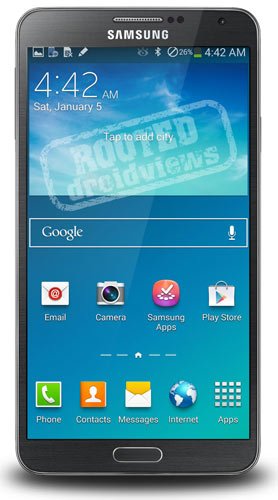
Root and Install ClockworkMod Recovery on Samsung Galaxy Note 3 SM-N900
After buying a new smartphone, the first thing we begin to look for a working method of rooting it. In most cases, our developers are fast enough to come with a rooting exploit within hours of a device’s release, and when it is aSamsung Galaxy flagship, it is just obvious that we look to one man, Chainfire.
CF-Auto-Root packages by Chainfire are the most known tools for rootingSamsung devices, and this time too the man is back in time with his weapon to gain root access on the Galaxy Note 3. With the release of his rooting package, it’s has now become very easy to root this new phablet device in just a few clicks. In the present guide, we would not only tell how how to root the Galaxy Note 3 SM-N900, but also describe the steps to install CWM Recovery on it.
Disclaimer:
The procedure given below is considered risky and so it must not be taken for granted.Rooting voids the warranty of your device and the method might put your phone at risk. In case of any mishap, DroidViews or the developers will not be liable for the same. You are the master of your phone and decision both.
Prerequisites:
Here are a few things to be taken care of before you move on to the real action. Please do not miss even a single item to avoid failure.
- Download the Odin tool and unzip the file: Odin3_v1.85.Zip
- Download Chainfire’s rooting package for the Galaxy Note 3 and extract the zip: CF-Auto-Root-Ha3g-Ha3gxx-Smn900.Zip
- Download CWM recovery for Note 3 SM-N900: N900-Cwm-Recovery-6.0.3.8(0929).Tar
- Make sure you have install Samsung USB Drivers Or Kies on your computer.
- Turn on USB Debugging on your device by going to Settings> General> Developer options.
Rooting Galaxy Note 3:
- Boot your Note 3 into Download Mode. To do so, turn off your device and then press and hold the Volume Down + Home + Power buttons simultaneously for 2-3 seconds. When you see the warning screen, press Volume Up to continue to the Download Mode.
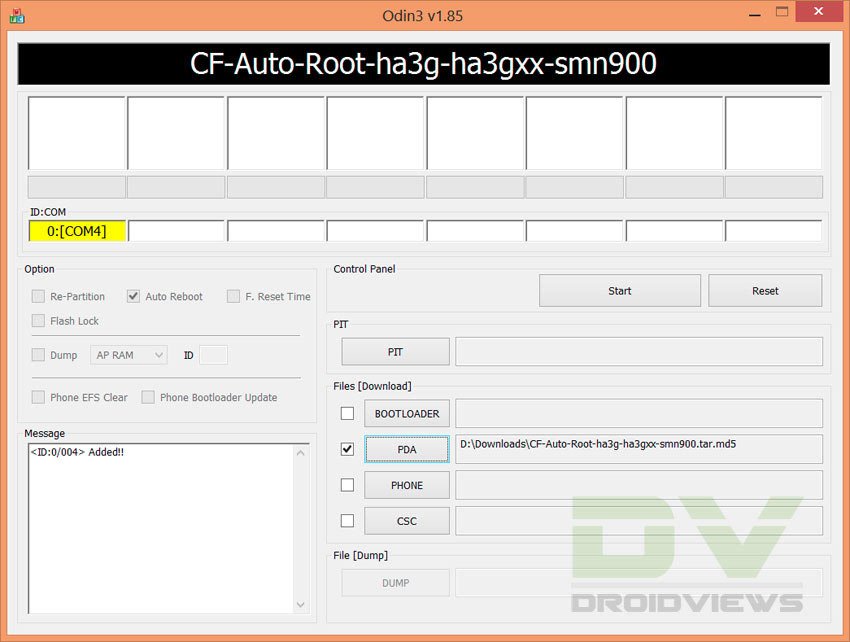
- Launch Odin and connect your phone to computer via USB cable. Wait till Odin detects your device. This is signaled by the ID:COM port turning to Blue and “Added!!” text at the message box on Odin.
- Make sure that only Auto Reboot and F. Reset Time option are checked on Odin.
- Click the PDA button and select the CF-Auto-Root file with .tar.md5 extension.
- Finally, click the Start button to initiate installation.
- CF-Root will be installed to your device in a matter of seconds and then you will see PASS!! message on Odin followed by automatic device reboot.
- Disconnect the USB cable and wait till the device reboots.
Go to your phone’s app drawer. You should now see a new app called “SuperSU” there. This indicates that your device has root access now. To further verify it, install the Root Checker app from the Google Play Store and run it.
Installing CWM Recovery on Note 3:
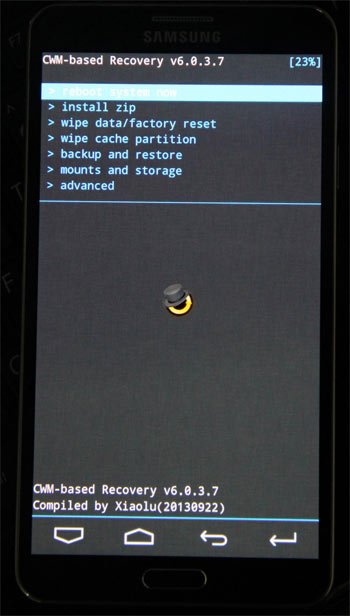
Having rooted your Galaxy Note 3, you can also install ClockworkMod recovery on it. Please note that this step is mandatory. Install a custom recovery only if you wish to install a custom ROM or mod, or backup your ROM. as for the installation method for the CWM file, it is the same as the rooting part. Just repeat all the steps from above. The only thing to be be careful about this time is to select n900-cwm-recovery-6.0.3.8(0929).tar file at the 4th step when you click the PDA button.
Subscribe to:
Posts (Atom)